
FlyCheck Roadmap Changelog Privacy Download
FlyCheck
Always in your menu bar

Go / No-Go.
Clarity at a glance.

The current weather at your airport sits in the menu bar, so the check costs you a glance instead of a browser tab, and the METAR and TAF are already decoded for you.

Download on the App Store US$9 lifetime

Requires macOS 14.6 (Sonoma) or later

VFR
Visual flight rules
MVFR
Marginal VFR
IFR
Instrument rules
LIFR
Low IFR

1. Search

Smart autocomplete for ICAO codes or Airport Names.

2. Monitor

Live status πŸŸ’πŸ”΅πŸ”΄ directly in your menu bar.

3. Decoded

See wind, visibility, and ceiling in high-contrast signage.

The reading

Built to help you decide.

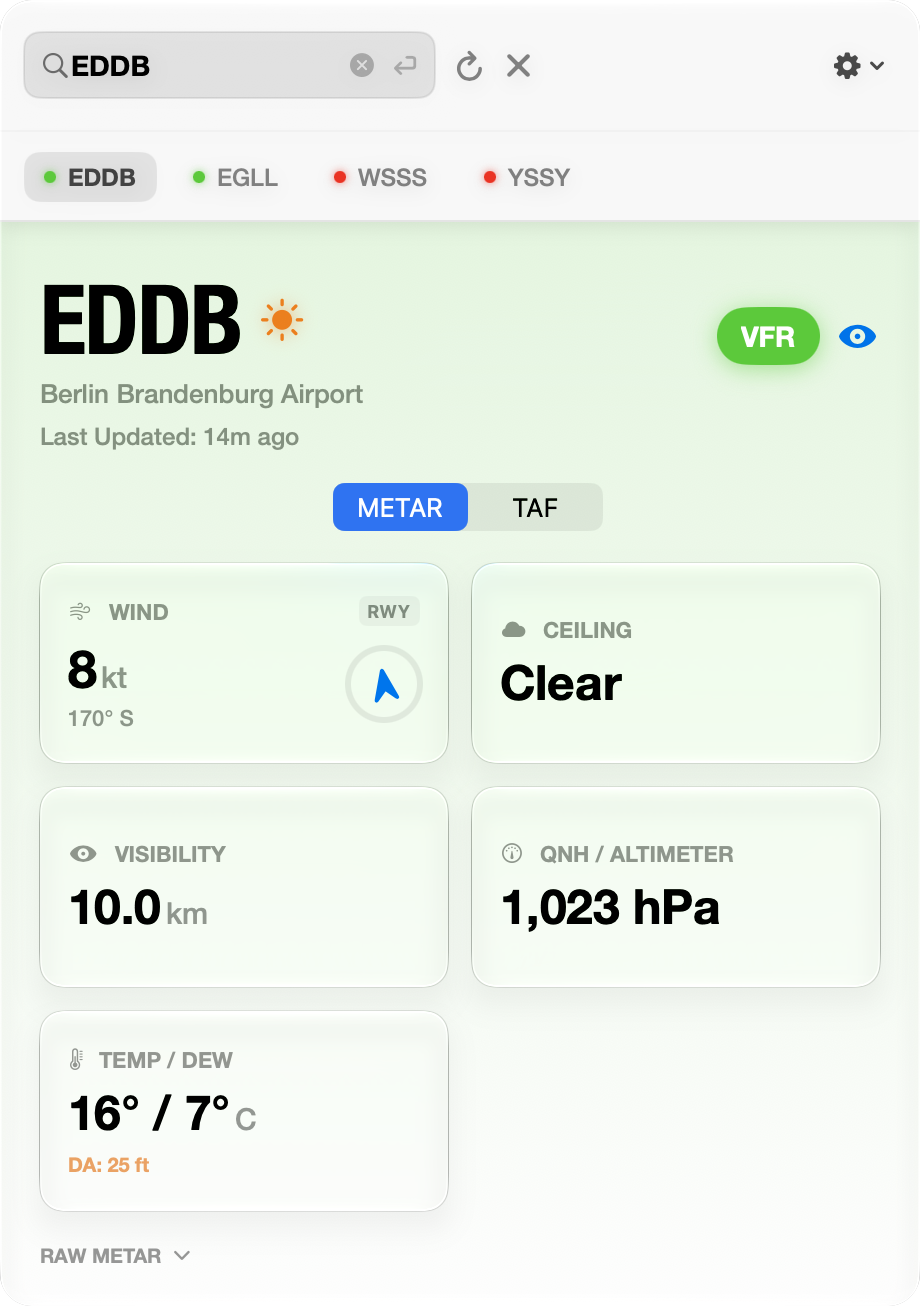
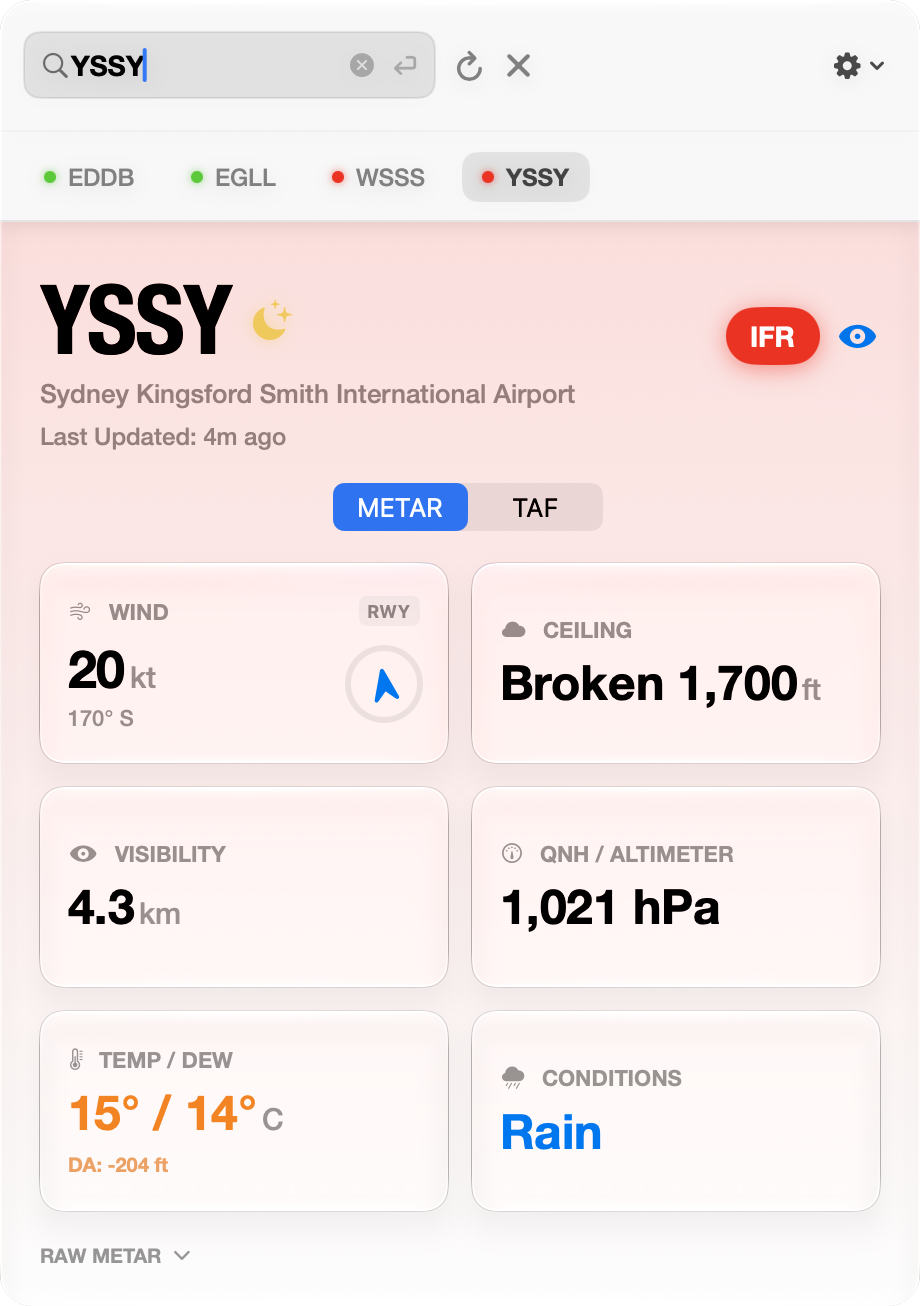
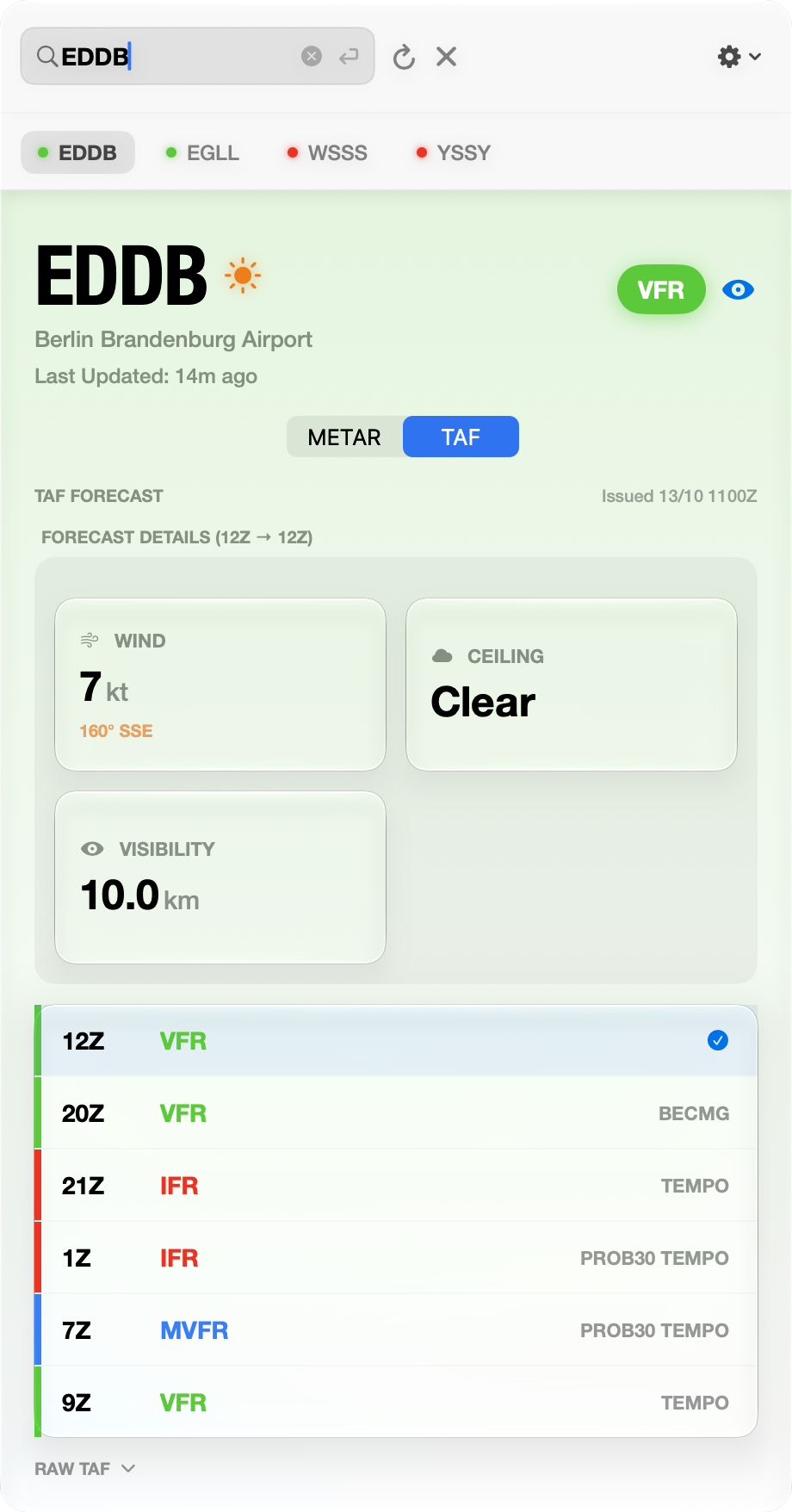
The panel takes the color of the conditions, so whether it is a go is the first thing you see. Wind, visibility, ceiling, altimeter and temperature follow, and the TAF lays the category changes on a timeline so you are looking at the trend rather than a single hour.

Berlin, VFR Sydney, IFR TAF timeline

Left to right: VFR, IFR with a broken ceiling and rain, and the TAF timeline. Captured on macOS 26.

Accuracy

Numbers you can trust.

BKN

The ceiling, as aviation defines it

The ceiling is the lowest broken, overcast or vertical-visibility layer. A scattered layer is not a ceiling and the card does not treat it as one. When a station reports no cloud data at all, the card says so rather than calling the sky clear.

8,316

Coverage that reaches small fields

Airport search covers 8,316 fields, including the small ones. When a small field publishes no weather of its own, FlyCheck reads the nearest reporting station rather than leaving the card empty.

Density altitude

Density altitude is computed from the app's own elevation table for 8,316 airfields, since the weather service does not return field elevation. New in 2.0.

Situational awareness

The interface and the menu bar icon change color by category, so you recognize the condition before you read a value.

Hybrid search

Type an ICAO code or a name, and "Heathrow" finds EGLL. Codes already on your clipboard are picked up for you.

Wind instruments

A compass ring and a rotating vector arrow show wind direction relative to north, so you read the crosswind rather than working it out in your head.

Signage typography

The card sets its numbers in Helvetica Neue Condensed Bold, the face used on physical runway signage, chosen for what it does at a glance rather than for how it looks.

Global altimeter

Units are detected by region and any card can be tapped to override them.

Private and native

There is no account to make and nothing is tracked. The app is native rather than wrapped in Electron, so it launches instantly, answers to keyboard shortcuts, and keeps the last reading on screen when the connection drops.

Why not just a website

The honest comparison.

FlyCheckWeb METARsHeavy EFBs
Launch speedInstant (0.1s)Slow (5s+)Slow (10s+)
ArchitectureNative (no Electron)Electron / webHeavy frameworks
VisibilityAlways in menu barHidden in tabsFull screen only
TrackingNoneRequiredVaries
OfflineCached last knownConnection errorCached
CostUS$9 lifetimeFree, ad supportedUS$100+/yr
Where it came from

The Berlin story.

I built FlyCheck in a Berlin hotel room while waiting for weather that never cleared. MVFR, occasional light snow, −5°C, overcast at FL10.

I was supposed to fly that day at EDAY Strausberg β€” my first time in a Skyleader 400. Instead I spent hours refreshing browser tabs, trying to work out whether conditions might improve enough to make the trip to the airport worthwhile. Every check meant a website, an ICAO code, dense text, and squinting for a trend.

The anxiety of not knowing whether to wait or cancel is worse than bad weather itself.

That flight never happened. But FlyCheck did.

β€” Alan Soon

Pilot grade. One-time purchase.

Pay once, keep it forever. No subscriptions, no recurring fees. $9 isn't going to make us rich, but it might buy some 100LL.

US$9Lifetime licence
Download on the App Store

Privacy Policy

We don't want your data; don't need it, don't care about, wouldn't know what to do with it anyway. FlyCheck is a utility tool that does its job without tracking you.

1. Data Collection

No Accounts: You do not need to create an account.

No Analytics: We do not use third-party trackers.

No Device IDs: We do not collect UDIDs or IPs.

2. Location & Storage

No GPS: We do not access Location Services.

Local Storage: History & settings stay on your Mac.

Cache: Weather data is cached locally for speed.

3. Security & Services

CheckWX API: Direct HTTPS requests for weather.

Sandboxing: Restricted via macOS App Sandbox.

Encryption: All communication is secure.

4. Contact Us

Questions about this policy? Reach out directly.

alan@fractals.sg β†—

Latest Updates

v2.0

The 2.0 Update

v2.0 · Oct 14, 2026

This release sharpens the readings. The ceiling now comes from the lowest broken or overcast layer, and density altitude is computed from FlyCheck’s own table of 8,316 airfields, so the number appears in Singapore and Sydney as well as in Denver. Airport search covers 8,316 fields, and the watchlist can be reordered from the context menu.

New

  • •
  • • Spotlight: airports are indexed, so they are findable from Spotlight too.

Fixes and accuracy

Folded into v2.0

Three defects found by reading the shipped code. Density Altitude had never rendered on any station since it shipped, and cumulonimbus was being discarded before it reached the screen.

Fixed

  • • Density Altitude now works. It waited on elevation data the weather service does not return, so the card stayed empty everywhere. It now uses a built-in table of 8,316 airports.
  • • Cumulonimbus is flagged. The ceiling card names the layer, shows its height and turns orange. It was being discarded at decode.
  • • Airport search covers 8,316 fields, up from 142, and a shared name resolves to the larger airport.
  • • The ceiling is the lowest layer, missing cloud data reads “––” rather than “Clear”, freezing precipitation has its own icon, and a missing wind no longer reads as calm.

The "Review" Update

v1.7 · Mar 4, 2026

A small release: FlyCheck now asks for an App Store review only when it sees you using the app.

New Features

  • • In-App Reviews: FlyCheck prompts for an App Store review when it knows you are getting value from the app, for example after checking it on a few different days or tracking a busy watchlist. The prompt appears inside the app, so you never leave your workflow to support us.

The "Berlin" Build

v1.0 · Original release
Feb 1, 2026

Welcome to the initial release of FlyCheck! A native macOS utility that puts real-time aviation weather (METARs) directly in your menu bar.

New Features

  • β€’ Menu Bar Resident: See Flight Category (VFR/IFR) and Wind Speed at a glance without opening the app.
  • β€’ Decoded Data: Raw METAR strings are parsed into a high-contrast, legible "Airport Signage" design.
  • β€’ Smart Clipboard: Open the app with an ICAO code on your clipboard, and FlyCheck will offer to fetch it instantly.
  • β€’ Hybrid Search: Search by ICAO code or Airport Name (e.g., "Heathrow" β†’ "EGLL").
  • β€’ Visual Wind: A dynamic compass ring visualizes wind direction relative to North.
  • β€’ Smart Fallback: If an airport has no weather station, FlyCheck automatically locates the nearest reporting station.
  • β€’ Global Units: Tap any card to toggle units (Knots/MPH, Celsius/Fahrenheit, InHg/hPa).
  • β€’ Native Performance: Built with SwiftUI for instant launch and minimal resource usage.
  • β€’ Privacy Focused: No accounts, no tracking, and no location services required.

Also on Raycast.

FlyCheck is a living tool. Your one-time US$9 purchase isn't just for today’s build. You're playing a part in a growing utility designed to eliminate every friction point in your pre-flight routine.

FlyCheck for Raycast

Available now · Install from the Raycast Store ↗

Instantly look up aviation weather (METAR) for any airport with a 4-letter ICAO code. This extension provides real-time, decoded weather reports directly in Raycast.

Powered by CheckWX (Free API Key required).

Extension Features

  • β€’ Instant METARs: Get up-to-the-minute decoded data from the CheckWX API.
  • β€’ Detailed Breakdown: View Flight Category, Wind, Visibility, Temp, and Pressure at a glance.
  • β€’ Effortless Actions: Copy raw METAR or decoded JSON. Refresh instantly with ⌘R.
  • β€’ Search History: Quickly access your recently searched airports.

Feedback & Questions

Got an idea for the next update?
Found a bug? Airport missing?

I read and respond to every email. Reach out directly for support (or just to say hi).

alan@fractals.sg